Inicio


Fake notifications impersonating the legitimate Social Security email address
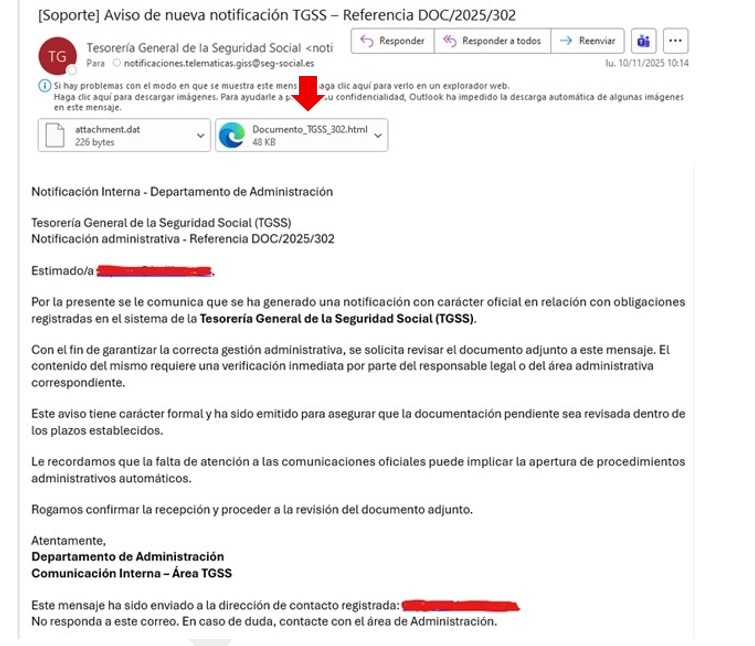
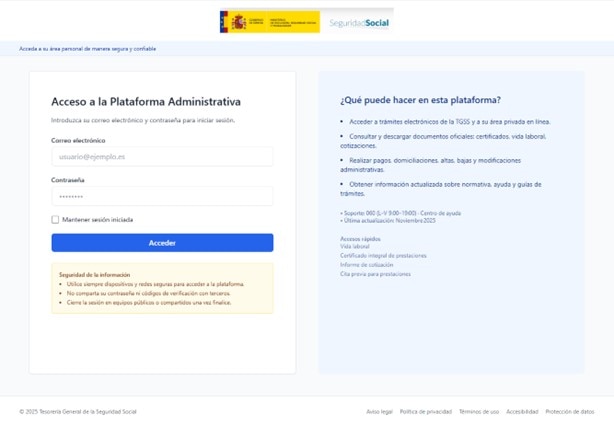
An email campaign has been detected in which emails are being sent in the name of the Social Security General Treasury (see image above), containing an attached HTML file. When you open this file, a fake Social Security portal appears, asking for your personal login details with the ultimate aim of stealing them from you.
How is it done?
By sending emails that appear to come from notificaciones.telematicas.giss@seg-social.es – which is the legitimate address used to send notifications – making it difficult to detect the fraud.
Who is it aimed at?
Both businesses and citizens.
Why?
As is often the case with this type of campaign, the person or company targeted is asked to take urgent action, in this instance to verify an alleged document. This verification would be carried out by logging into a portal using the user’s usual login details. This appears to be the aim of the campaign: to obtain the user’s login details and thereby impersonate the recipients.
What do we recommend?
Being wary of these emails, which contain links to fake websites, purport to be from the Social Security Administration and ask you to enter passwords or access codes. In this regard, it is important to remember that the Social Security will never ask you for your email address and password as a means of identification. If you’d like to find out more about the identification methods used by the Social Security, please see Cómo identificarme.
How can you tell if they are fraudulent?
They often contain spelling mistakes, unfinished or poorly worded sentences, outdated or pixelated logos, very short and incorrect deadlines for taking action, and, above all, they urge people to act quickly and urgently.
Recommendations and resources
If in doubt, call the official Social Security telephone numbers to check whether the communication is genuine or not. Further information is also available on the website of the National Cybersecurity Institute (INCIBE).